
2
Mar 2011
Getting a Service Tag From a Command Prompt
Tags: Dell, Networking, service tag, Networking
The Problem:
You need a service tag quick, fast, and in a hurry. You're armed with nothing but a command prompt.
The Solution:
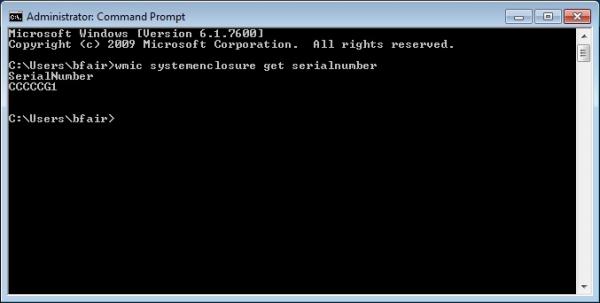
Open up that command prompt, and type in "wmic systemenclosure get serialnumber" -- that's the magic spell that will provide you with your service tag. If you have an HP Server or IBM Server, or really any other server, it will provide you with their serial numbers too.
Quite handy, it is!


Click to get started.
4 comment(s)
Comments
Great Tip
Great tip, especially considering the service tag sticker fell off my laptop. Thanks Brad!
Getting a Service Tag From a Command Prompt
Nice information its usefulness and significance is overwhelming the way you covered all the basic necessary information is really impressive good work.
Another command
You can also run "wmic bios get serialnumber" as well.
bailey button triplet boots
f you have an HP Server or IBM Server, or really any other server, it will provide you with their serial numbers too.