
Blog Channels
Tricking Drupal webforms into allowing multiple options with the same key value


Tricking Drupal webforms into allowing multiple options with the same key value
I recently had a project where we needed to setup a webform to request more information about training events that were hosted around the world in different cities. Depending on what city the event was in the form needed to be sent to a different email address. The issue I ran into though was several cities (options) needed to be sent to the same email address (keys).
The basic setup for this is on the webform configuration page you need to setup one of your fields to be a 'Conditional e-mail recipients.' In my case I have a field called 'Workshop' which has a "safe_key|Some readable option" setup within the Options field that I will use to send the email to so I select it.
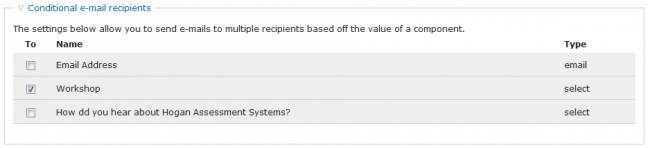
At first I added in all my values let's say they are as follows:
usa@example.com|Oklahoma City - June 2010
usa@example.com|Tulsa - July 2010
usa@example.com|Stillwater - July 2010
gb@example.com|London - August 2010
gb@example.com|Manchester - September 2010
When I go to save the field I just get an error saying that "Options within the select list must be unique. The following keys have been used multiple times:"
And lists the keys that are duplicates.

The issue is the email address is the key and all keys must be unique. I don't want to setup a different email address for every option in my list so I needed to figure out a way to make it work.
I thought maybe I could add "?subject=Oklahoma City" to the end of the key which would make each one unique but it did not work. I was able to save the field but the emails never came through and I got no errors when submitting the form or in the Drupal error log.
My last thought was what would happen if I added spaces to the end of the key? So for in my example above I used the following values:
usa@example.com|Oklahoma City - June 2010
usa@example.com |Tulsa - July 2010
usa@example.com |Stillwater - July 2010
gb@example.com|London - August 2010
gb@example.com |Manchester - September 2010
So you can see that the first key has no spaces, the second duplicate key has one space and the third has two spaces. You can continue this out for however long you need. In my real life scenario I had to use seven and eight spaces on some of my keys.

I saved the field and tested the form and the emails came through just fine to the respective email address defined in the key value.
If this helped you out please let me know by leaving a comment below or giving me a shout out on twitter @rgbivens

14 comment(s)
Comments
KC
AWESOME!!!!
AMAZING!!! I hate stupid little hacks that beat me up to a point of hair loss and frustration (not necessarily in that order ;-)
I have been fighting this animal off and on for a few days. Drupal.org was of little value. I appreciate your assistance.
Thanks!!!!!
Kent
http://www.rawdesigners.com
Jason
Wow - we almost went through
Wow - we almost went through and wrote out a lot of custom code to override all this stuff. Thanks a lot.
Jojo
Thanks a lot for this trick
Thanks a lot for this trick !!!!
Tim
Thanks!
Thanks gbivens
That would have been my next option, but I'm glad I got some confirmation before going ahead!
claude
GREAT! Thank you very much :D
Popcorn Man
Thanks
Thanks - didn't think of that one. I am surprised this validation is actually required. There are so many scenarios where you have the same key but different option text to make it easy for visitors to select the right one.
eric scoles
It's actually non-validation,
It's actually non-validation, in a sense: The keys are array keys, and the value of subsequent key|value pairs just over-writes the value corresponding to the same key.
eric scoles
For someone who wants to
For someone who wants to actually use the Conditional Recipients feature, this is the only technique I've found that works to permit repeating email addresses in the select list. There's a commonly-given solution that involves setting up a key-value pair that looks like this:
mail@example.com,1|value
... but that does not appear to work.
HOWEVER: I do NOT advise using this feature, as it exposes the email addresses in clear text to email harvesting bots. (I had been told -- misinformed -- that email addresses are encoded in HTML. They are not: They are in clear text.)
So, from my perspective, at this point (January 2011) there is no conditional recipients feature in the Webform module.
texas-bronius
clever :) If you want to feel better and less hackish...
Another idea, if your email server supports it, is to take a tip from this gmail help post:
http://gmailblog.blogspot.com/2008/03/2-hidden-ways-to-get-more-from-you...
Use pluses (+) or dots/periods (.) in the first part of your email to reuse emails. Might even help you route your emails down the road!
ex:
bronius+us@mail.com
bronius+canada@mail.com
bronius+d.o@mail.com
should all route to bronius@mail.com. Note: Gmail will let you further filter on the +value!
BA
Thanks for this!! Would have
Thanks for this!! Would have never thought of it and it was so helpful.
