
Overview/Problem
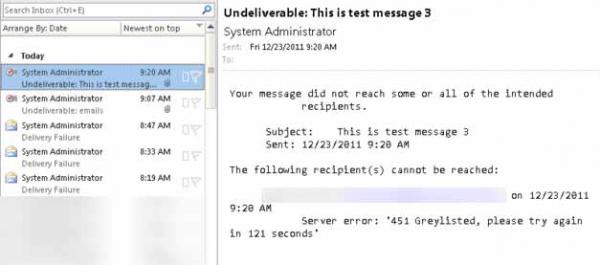
This article explains how to fix the 451 Greylisted, System Administrator message that is received when you send an email to someone that has the same domain name.
Example: If you had the email person1@domain.com and were trying to email person2@domain.com, you will get a message from the system administrator with a message regarding ‘451 Greylisted, please try again in XXX seconds’
What is Greylisting?
Greylisting is one of the methods used to stop/reduce spam. Mail servers that have this option enabled temporarily delay messages until messages are rereceieved to confirm that the message is real. In the earlier days of the internet, most spammers would send a spam message to a user once, thus the message was not resent. Today, that has changed a bit, however, greylisting has been adapted with other anti-spam methods and is thus still useful today.
If you would like more information, can find out more from http://greylisting.org/ and http://en.wikipedia.org/wiki/Greylisting
How to Fix – Adjusting your SMTP Authentication
To fix the greylisted error for mail clients, your users must use SMTP authentication to prevent getting greylisted. In Microsoft Outlook 2003, 2007, and 2010, this is a fairly quick fix.
You will need to adjust your mailbox account settings. You can do this by going to:
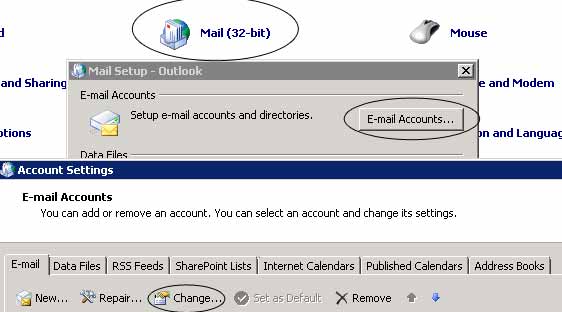
- Open Control Panel
- Click Mail (or Mail x32 in my example)
- Click Email Accounts
- Click Change
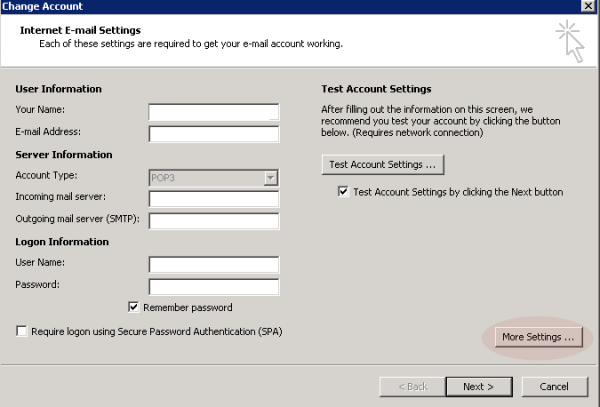
- Click More Settings
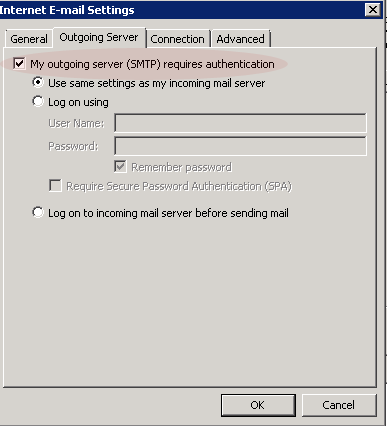
- Select the Outgoing Server tab
- Check “My outgoing server (SMTP) requires authentication.”
If you have specific credentials you need to use, you can change your settings to “Log on using”
Now send a test email to someone with the same domain name as yourself!
Done!
Related
