Blog Channels
How to Fix Veeam 6 Object ‘Server’ Not Found Error in VMware
Summary/Purpose
The purpose of this article is to explain a few instances of how an “Object Server Not Found Error” may occur and to show how to modify your Veeam database to fix your jobs in the event that:
- A vSphere server has crashed beyond a recoverable state
- A server has been removed and added back into the inventory in vSphere
Overview
In have a handful of occasions where I have had Backups and Replicas that were running successfully, stop working. In 3 separate instances on a VMware environment, I have experienced an error in Veeam denoting that “Task failed Error: Object <servername> not found."

In all 3 instances, the backup files (.vbk and .vrb files) were still usable in Veeam, i.e. components such as the Restore Guest File (Windows), however every time I tried to run the backup or replica job, the job would immediately fail. This article explains how to fix the backup job to function correctly in the following scenarios:
- Migrated a server to a new host (ESX/ESXi)
- Loss of VM ID via loss of VMware vSphere Server (root of the 2nd and 3rd issue are the same)
- Removing a server from your inventory then adding it back into vCenter. (root of the 2nd and 3rd issue are the same)
Veeam Job Configured with ESX/ESXi
When you initially create your job(s), you want to make sure that you add all your servers from the vSphere Server in the ADD OBJECTS screen.
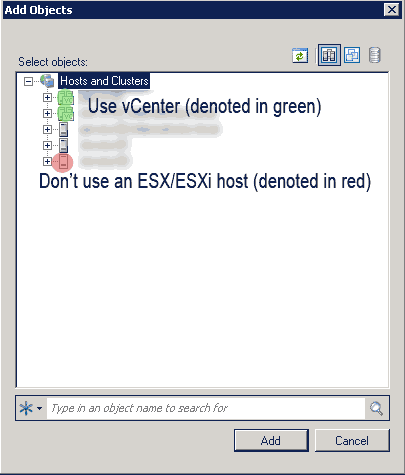
If you have multiple ESX/ESXi hosts, this is important because if you ever migrate to another host, your Veeam backup will still try to point to the original mapping on the ESX/ESXi host. Thus, the server will appear unavailable to Veeam. However, if you have a vSphere server, the path will be mapped via the vSphere server.
Virtual Machine ID was Changed
It is important to note that VMware assigns a unique ID to each VM. If a vSphere server is lost or if a VM is removed and added back to the inventory, the ID number of the VM will change. Although you can use Veeam to create a backup a vSphere server, I have seen instances where the backups did not span back far enough and the server could not be recovered. In addtion to Veeam's backups, I would suggest that VMware’s recommended backup for a vSphere server be considered, which can be found here: http://blogs.vmware.com/vsphere/2012/02/uniquely-identifying-virtual-machines-in-vsphere-and-vcloud-part-1-overview.html.
How to Lose/Reassign your VM ID
The most common ways I have seen this occur are:
- Losing the vSphere server and rebuilding from scratch. This will cause all the VM-ID's to change.
- Someone with administrative access to vSphere removes a VM in the vSphere inventory. At a later date, that virutal machine is added back into the inventory.
The Fix: Modifying Your Veeam Database
STEP 1: Identify which VM’s are failing and in what Veeam job(s).
This can be done by looking at the job logs.

STEP 2: Open up PowerCLI on the vSphere server.
Once you have identified the VM’s, open up vSphere PowerCLI.
Type in connect-viserver <vSphere servername>
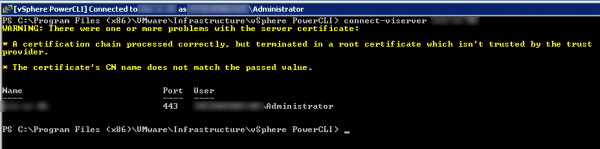
STEP 3: Pull all the ID’s associated with your VM’s.
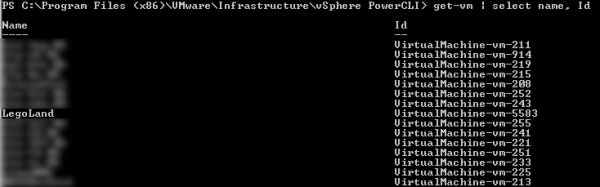
Next, you’ll want to run the command get-vm | select name, Id
Note: If you have hundreds of VM’s in your library, you can individually pull the problem VM instead of the list of every VM in your inventory.
In the example I have shown below, the name of the problem server is Legoland. Note that the ID is vm-5583.
STEP 4: Pulling the Old ID’s from your Existing Veeam Job
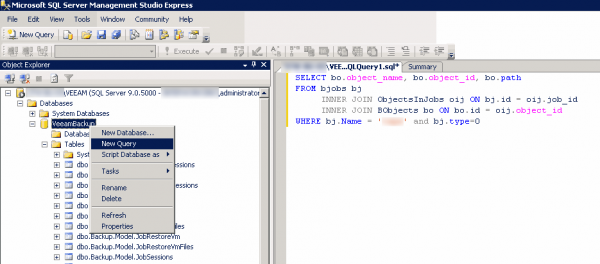
In the example below, I used Microsoft SQL Server Management Studio Express (this is free and can be downloaded at http://www.microsoft.com/download/en/details.aspx?id=8961) to open up my Veeam database.
I created a new SQL query that will pull all the object_id's (this will be the equivalent of the vm-id) from an existing job.
SELECT bo.object_name, bo.object_id, bo.path
FROM bjobs bj
INNER JOIN ObjectsInJobs oij ON bj.id = oij.job_id
INNER JOIN BObjects bo ON bo.id = oij.object_id
WHERE bj.Name = '<job name in Veeam>' and bj.type=0

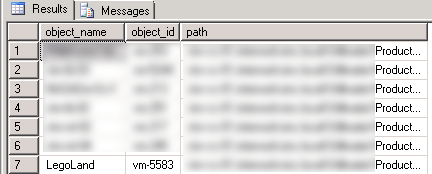
This will pull a list of servers in a job of my choosing. In my example, the old ID for Legoland is listed as vm-228 in Veeam’s database.

STEP 5: Adjust the ID’s in your Veeam Job
Here I will show how to adjust the old ID, vm-228, to the new ID pulled from STEP 3, vm-5583.
CAUTION: Be VERY careful when executing the next command. Syntax is VERY important. If you do not feel confident in your ability to execute queries, chat with a database administrator or someone that has knowledge on SQL queries.
You will want to make a new query or execute the following:
UPDATE bobjects
SET [object_id] = 'new-id'
WHERE [object_id] = 'old-id’
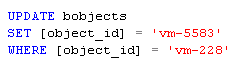
With my example, this will be:

STEP 7: Verifying the ID Changed Successfully
Next, you can verify that the new ID is in place by executing the following command again:
SELECT bo.object_name, bo.object_id, bo.path
FROM bjobs bj
INNER JOIN ObjectsInJobs oij ON bj.id = oij.job_id
INNER JOIN BObjects bo ON bo.id = oij.object_id
WHERE bj.Name = '<job name in Veeam>' and bj.type=0

Now adjust all the VM's your having issues with and your Veeam Backup job will start working again.
Edit: As noted in one of the comments below, CBT has been known to stop working after applying this fix. See the following Veeam KB article http://www.veeam.com/KB1113 to fix CBT.
If you would like to learn more about Veeam Backup & Replication, visit http://www.veeam.com/vmware-esx-backup/vmware-esx-esxi-vsphere-vcenter.html.


16 comment(s)
Comments
Chris Gesicki
How to fix a Veeam replica job
Your sql query works great and helped with fixing some of our backup jobs. I was wondering if you have a sql query that will help query the id for a replica job that is failing as well.
Thanks in advance,
Chris
ijahanshahi
Low Connection Bandwidth Seeding
Hi Chris, I'm glad the post was useful. Unfortunately, I never found a way to map the replica's with the new VM-ID by modifying the database. However, the next best option available would be to enable low connection bandwidth, which does allow you to reuse your existing data.
You can do this by:
If you read the message below the "Map replicas to Existing VMs" on the "Seeding tab", it states that "If you already have some replicas created on target, replication job can reuse them. In that case, only difference will be transferred on the first job run". This should help you reseed your job with a substantially lowered replication time than starting from scratch.
Let me know if this works for you.
-Ideen
John
This worked great!
Ideen your fix worked great!
For me CBT stopped working on all 6 VMs that I used your routine on, but I followed the following KB to resolve that easily - http://www.veeam.com/KB1113
Thanks for the good info. I hope that Veeam include some kind of ID re-mapping feature in future releases.
ijahanshahi
Hey John, I'm glad you found
Hey John,
I'm glad you found this article useful and thanks for posting the KB article. I know that we've had to use it to fix CBT on a few environments. I'll update the blog article in the future as well for any potential visitors.
Thanks,
Ideen
Flesz
It doesn't work in Veeam 4.1
I have similar problem where I had to restore the VM from backup. The veeam job fails with the error object not found. The SQL query you provided doesn't display any information. I presume it works only in Veeam 6 not 4.1
ijahanshahi
I've never tried looking at
I've never tried looking at the database for anything lower than 6.0, so I'm not really sure how the database might look architecturally. I have very limited knowledge of Veeam 4, but I know there are a ton of performance increases from Veeam 5 to Veeam 6. If you still have support for Veeam, I would suggest upgrading to a newer version.
Vito
Thanks for the tip
I just ran into a problem with a host that stopped responding and therefore could not migrate the servers off using vmotion. I powered off each vm manually by RDP and then restarted host. Now backup jobs fail with the error mentioned. I now have this same error and I am happy to find a solution but it sucks when some of these are production servers such as exchange that I now need to book another time to fix the CBT issue.
I love Veeam but this is really an unacceptable solution to have to do this step to resolve CBT issues and cause another outage.
Anyway my ranting over on what Veeam needs to fix.
Thanks for taking the time to post and share what worked for you. It'll help me resolve this in the end until next host crash.
ijahanshahi
CBT and Veeam
Hi Vito,
If you're getting the CBT error: Cannot use CBT: Soap fault. A specified parameter was not correct. . deviceKeyDetail: 'deviceKey', endpoint: ''
You don't always need to apply this fix. I've found on some environments that CBT will error out on a handful of VMs, but the next day CBT start functioning again once the backup job has had a chance to complete. Keep in mind that you actually don't need CBT for Veeam to take backups as all CBT is doing is keeping track of all the changes you did from your last backup. CBT is more of a performance enhancer for your backup and replication speeds as instead of having to read the entire VM for your differentials. Depending on your environment, proxies, frequency of backups, and resources available, having to read the entire VM again may irrelevant as it might not affect your RPO and/or backup window.
On the flip side, if you don't have the flexibility to have an increased backup window, this might be an issue for your business. I don't know what would work best for your business, but you might try running the job again to see if CBT fixes itself. Also, I'm not sure what version of Veeam you're running, but you might try upgrading to 6.1 as well to see that if helps with your issues. I have seen performance increases in every environment with a lot less 1-off issues, and I've heard a lot of other techs in the industry having the same kind of luck as well.
Patrick
Invalid object name
Hi,
If I run the query I got this error:
Msg 208, Level 16, State 1, Line 1
Invalid object name 'BJobs'.
How can I solve this?'
Kind regards,
ijahanshahi
Wrong Version of Veeam
Hey Patrick,
The query above is made for Veeam 6+ and references a table called BJobs. With the error you posted, my guess is that you're running a different version of Veeam so it can't physically find the BJobs table. I know that some of the older versions of Veeams look a bit different when looking at their databases; do you know what version of Veeam you are you running?
-Ideen