Excel 2007: "There was a problem sending the command to the program"
If you have ever tried to open an excel document and received the error that says "There was a problem sending the command to the program", you can fix it by doing the following:
- Open Excel 2007
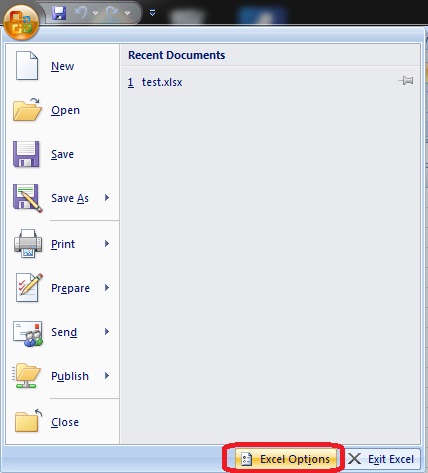
- Open the Menu in the top left
- Click the "Excel Options" button

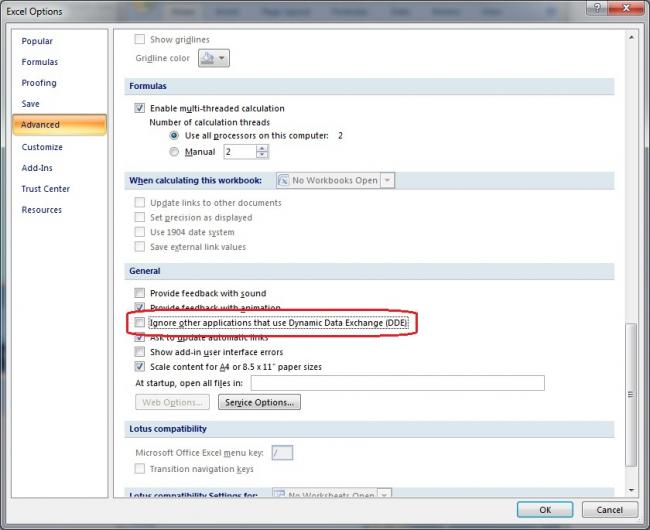
- Click the advanced tab on the left of the options screen
- Under the general options uncheck the box "Ignore other application that use Dynamic Data Exchange (DDE)"


Comments
Thank you so much....ive been
Thank you so much....ive been trying to solve this problem for like 3 days and htis was such a simple fix. Thank you.
Thanks!
I've been looking for weeks on how to fix this, thanks for having it so clearly stated, fixed excel perfect!!
No problem
I'm glad that it helped you out.
Still a problem
Tried the solution, but I still get the error message and still cannot open Excel files by double-clicking them. Any other ideas?
Still a problem
One thing to check is which add-ins are installed. If there are any, you may want to try and disable them just to see if the problem goes away.
If it does end up making the problem go away, you can try and re-enable them one by one till you find the one that causes the problem.
Thanks a lot
Thanks josh, It really helped me out
You are the best! Thanks Josh
You are the best!
Thanks Josh
Amazing. Thanks a lot, you
Amazing.
Thanks a lot, you saved me a lot of time.
OMG!!! THANK YOU
OMG!!! THANK YOU SOOOOOOOOOOOOO MUCH!!!!!!! FINALLY!!!!! I've looked for the solution to this problem for the past 2 days and no one ever could figure it out! :):):)
Wow, worked for me
Wow, I'm using a 3 month old Windows 7 laptop with Office 2007 I started getting this issue with Excel and Word about a week ago for unknown reasons. I cleared the checkbox shown in Excel Options and now the problem is gone in both Excel and Word. I don't know why, but I'm really happy to have found this post via Google! Thanks Josh