Excel 2007: "There was a problem sending the command to the program"

1
Feb 2010

Excel 2007: "There was a problem sending the command to the program"

comment icon498 comment(s) |

If you have ever tried to open an excel document and received the error that says "There was a problem sending the command to the program", you can fix it by doing the following:

  1. Open Excel 2007
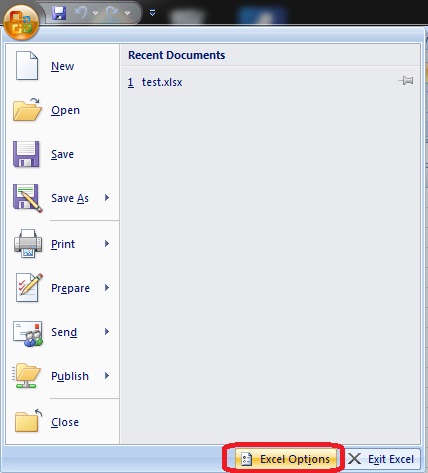
  2. Open the Menu in the top left
  3. Click the "Excel Options" button

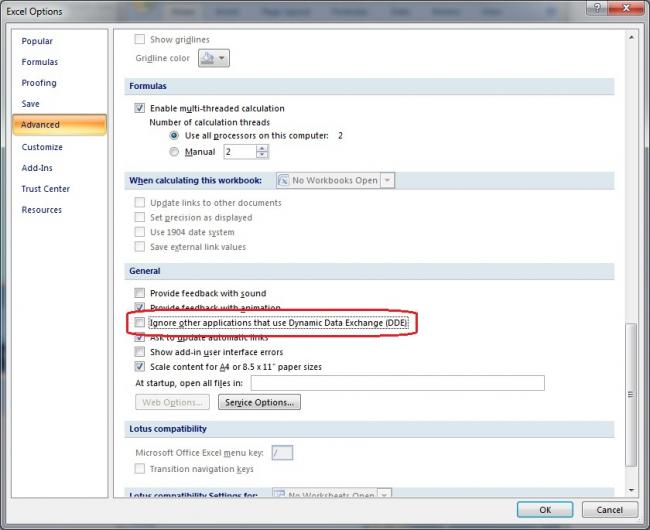
  4. Click the advanced tab on the left of the options screen
  5. Under the general options uncheck the box "Ignore other application that use Dynamic Data Exchange (DDE)"

Comments

August 10, 2011

Kalidhasan

thanks a lot. its working for

thanks a lot. its working for this simple issue i am taking 1 week time. once again thanks

October 19, 2011

Anonymous

This does not work for me

I have tried to uncheck the dde and it still dont work. I have renamed the reg keys. Unchecked all boxes in properties.
running w7 box ms office 07. issue is with excel only

October 24, 2011

kady

thank you so much for the

thank you so much for the solution, finally excell is working on my computer. That was very helpfull. Thanks again

November 14, 2011

Samir Ragheb

Yes, it finally works!

Thank you so much for your help, but you need to add that the program should work in compatability with windows 7, because I have changed the settings in the process. One shoud go to excel prperties and change copatibility in order to get things back to normal... Thanks again.

February 11, 2012

anil Singh

THANKS YOU VERY MUCH

THANKS YOU VERY MUCH

November 12, 2012

manoj

Thakns

Thanks......

August 16, 2011

Anonymous

Thanks so much!

Thanks so much!

September 28, 2011

cap4life

thanks!

It worked!! Thank you :)

November 8, 2011

rrrrrr

Thanks

thanks i tied 2 other sites before yours they didnt work
yours did
2 of my goats and my daughter are for you

December 12, 2011

Anonymous

Thank you Solved my problem

Thank you
Solved my problem in seconds.

Search