
Outlook 2010 re-index issue after Microsoft patches

30
Jun 2011

Outlook 2010 re-index issue after Microsoft patches

comment icon4 comment(s) |

After some recent Microsoft updates, some folks may have noticed that they cannot search their Outlook items anymore. Where they used to get a good list of items when searching they now receive the following message: "Search results may be incomplete because items are still being indexed. Click here for more details."


And when you click on that message, it shows something like this:
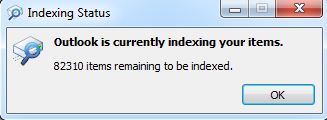
 

This, unfortunatley, is planned and part of the recent batch of updates from Microsoft. The only real recourse is to let the indexing process finish, which can take quite a while. Try though I may, I could not figure out which one was the culprit, but the only updates I showed are below:
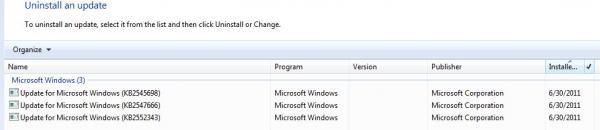
If anyone can figure out who the culprit is, let me know. :)

Comments

June 30, 2011

jvalente

Other OS's or versions of Outlook

I'm running Windows 7 X64 and Office 2010. If you've noticed the same issue, and have a different config, please post it.

July 7, 2011

Justin Jones

I believe the update that causes the problem is KB2547666

I believe the update that causes the problem is KB2547666

This update changes the way timestamps on search index files are stored from a simple timestamp to a universal time (UTC) plus a local time zone bias plus daylight savings time bias. That way, if you change your time settings or timezone, the timestamp is correct to your local system time.

Outlook 2010 (or Outlook 2007 on Windows 7 or XP with instant search installed) uses Windows Instant Search to index emails. If you look at the affected files, you will notice rebuildsearchindex.exe has been altered, which is a dead giveaway that a search index database will have to be rebuilt.

The good news is the updated timestamps will give you accurate timestamps for files even if you change timezones.

July 7, 2011

Justin Jones

I believe the update that causes the problem is KB2547666

I believe the update that causes the problem is KB2547666

This update changes the way timestamps on search index files are stored from a simple timestamp to a universal time (UTC) plus a local time zone bias plus daylight savings time bias. That way, if you change your time settings or timezone, the timestamp is correct to your local system time.

Outlook 2010 (or Outlook 2007 on Windows 7 or XP with instant search installed) uses Windows Instant Search to index emails. If you look at the affected files, you will notice rebuildsearchindex.exe has been altered, which is a dead giveaway that a search index database will have to be rebuilt.

The good news is the updated timestamps will give you accurate timestamps for files even if you change timezones.

August 17, 2012

B Nash

Outlook 2010 re-index issue after Microsoft patches

Everythng looks like the same issue for me but my # of un-indexed items has been climbing about 2,000 per day since I realized this was an issue a few weeks ago. it went from 19,000 on Tues to over 25,000 as of today Friday.

Search
