
Blog Channels
Outlook 2010 stuck on loading profile window
I have noticed at various times when I close Outlook 2010 and re-open, it gets stuck on the Loading Profile screen. The only way I found to alleviate the issue is to reboot the computer and Outlook will open correctly.

I Searched the internet but was unable to find a valid fix for the problem. After a little research, I found multiple entries for agent.exe in the taskmanager.
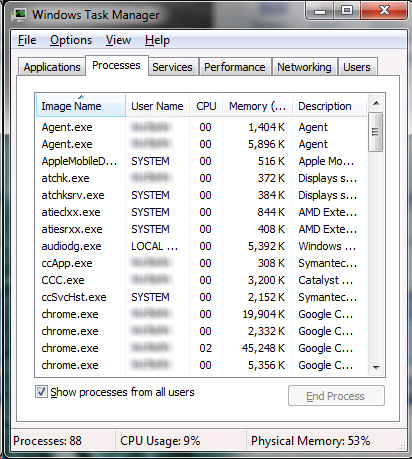
Once both of those were closed, Outlook opened properly without having to reboot the computer.
- Larry
Edit:
Thanks to the anonymous poster on 04/09 for a permanent work-around to this issue in Win7. Follow these instructions:
1) Right click the agent.exe process and click properties.
2) Change the compatibility mode to Windows XP SP3.
3) Terminate agent.exe as above and restart Shoretel/Outlook or reboot your computer.
Unfortunately, this does not fix the issue in WinXP.
- Larry


35 comment(s)
Comments
rboyles
Thank you for this. I've ran
Thank you for this. I've ran into it a few times and it was super annoying.
Anonymous
Thanks for posting this
jvalente
Possible Fix
I was having this same issue. The Agent.exe is from the Shoretel Call Manager, and typically loads before you ever have a chance to crank up Outlook, hence the problem.
At first, I just set Shoretel Call Manager to not start with boot, but of course, if you needed to close and reopen Outlook, the problem was sometimes still there (although, strangely, not as much).
My ultimate fix was the item above, and subsequent re-installs which fixed not only the hanging issue, but also an issue where my Outlook contacts would not import into the Call Manager. It all works great now.
Might consider trying to re-install, and of course, make sure you are using the x32 version of Office 2010, as that''s the only one compatible with the Shoretel Call Manager app.
Cells
Thanks
Thanks a lot. I thought my outlook was crashed and i need to reinstall. In my case, I've found two outlook.exe is running in the task manager. Closing one of them (the biggest size) solve the problem.
mendel
yep
yep, shortel made my outlook cripple :-)
thx ;-)
Jason H.
Worked like a charm!
Thanks for posting this! It's been driving me nuts for quite a while now but had no idea ShoreTel was the culprit.
Thad
Little Program for your users
Wrote this up in a little exe so you can just give it out to your users. I find this helpful.
https://docs.google.com/uc?id=0B8c1_6dB1xVXMmQ2MzkwYmEtYzI2ZC00ZjhmLWE2O...
Thad
dave
hi.. ive downloaded this file
hi.. ive downloaded this file before, but i lost it.. can you please reupload the file?
thanks
Mike
Thanks!
Worked for me too. First time I've had this happen to me. Closing the "Agent.exe" processes allowed me to open Outlook after it crashed on me.
Amit
Thanks
Thanks very much for posting this. This problem was quite irritating. Really appreciate your post.