
21
Jan 2011

Issues sending Ctrl+Alt+Del through VNC or GoToAssist in Vista and Windows 7

comment icon4 comment(s) |

If you use remote administration and troubleshooting software such as VNC or GoToAssist, you may have noticed a growing issue regarding the standard domain login screen with Windows Vista and Win7.  Regardless of previous functionality, suddenly pressing the "send ctrl+alt+del" button doesn't work.  

Although this is generally not the end of the world, it is a common nuisance.   Here's what's causing the issue and the workaround to fix it:

1.  On the remote computer, Click Start > Control Panel > User Accounts > Change User Account Control Settings
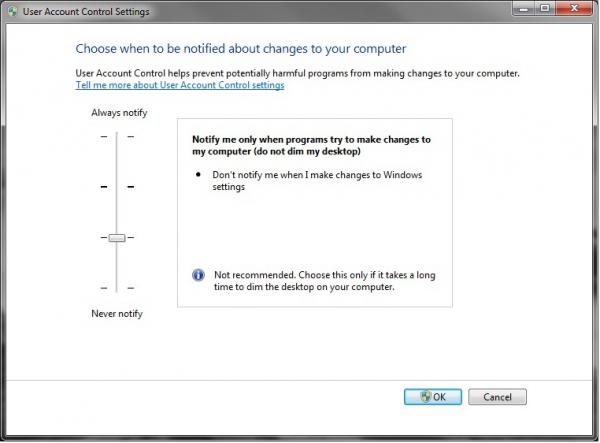
User Account Control

2.  Move the slider up one setting to "Notify me only when programs try to make changes to my computer (do not dim my desktop)

3.  Click OK and reboot if prompted.

This should give you the ability to "send Ctrl+Alt+Del" using Vista or Win7 through your remote administration software.

Subscribe to our Networks

IW on Facebook

Comments

Lar, once again, you nailed

Lar, once again, you nailed it.

I would love to use this solution...but can't.

I work with an app that uses file monitoring, capturing mouse-clicks, and capturing key-presses. It does not work unless UAC is all the way off. It runs but doesn't capture. This means that I can't send Ctrl-Alt-Delete remotely. I tried setting UAC to the level suggested here, but then my app stops working :(

Another option

Take a look at this post. Worked for me on Server 2008 R2.

http://forum.ultravnc.info/viewtopic.php?t=17476&sid=128df65e4cffdf1570c...

David B Kite

UltraVNC 1.0.9.6.1

This solution does not work on a Windows 7 64bit machine.